
If you own a business and have to manage social networks yourself, or if you work in this direction by profession, managing pages, running ads, and receiving and processing analytical data, then you will need support from Facebook support at least once. Based on our own experience, we will share with you information on what problematic issues the Facebook support team can solve and how to contact them.
Through an illustration, we will show you each step you will need to take to contact Facebook support.
There are two ways to start communication. The article will discuss both of them.
- Open the business page and highlight the following data.
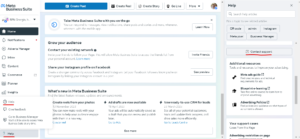
After you select to communicate with the support team, the following box will appear, where you can briefly describe the details of the current problem.
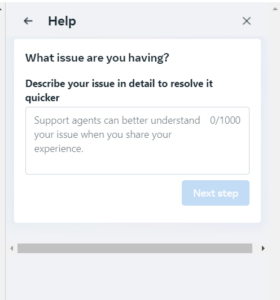
After filling in this field, a Facebook support representative will enter your private chat on Facebook Messenger to help you resolve the issue. Please note that depending on the issue, you will need your Business Manager ID, or Ad Account ID, or Page ID, which you will need to share with Facebook support.
2. Now I'll show you the second way to contact Facebook support. In the Google search box, type contact Facebook support and select Help centre.
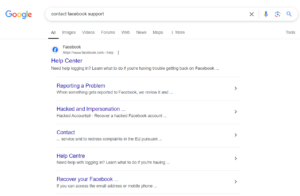
After moving to the next page, select visit business help centre.
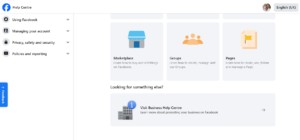
Mark the highlighted data in the photo.
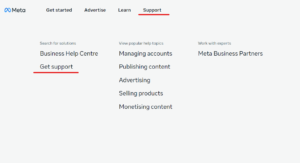
Where you will similarly write down information regarding the current problem.
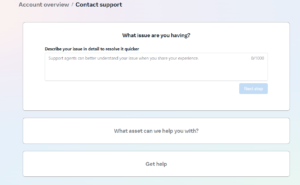
Now I will highlight a few topics that Facebook Support can help you resolve quickly and effectively:
-
- Technical error : If there is an error with your page, ads, or account settings (for example, there is a problem logging in, ad results are not loading completely).
- Advertising issues: If you encounter problems managing your Facebook ads, such as incorrectly approved ads, payment issues, or ad optimization tips not working properly.
- Account Security: If your account is lost, hacked, there is a problem verifying your account, or you cannot recover your password.
- Policy Violations and Appeals: If Facebook has deemed your account or ad content to be in violation of its policies, you will need to contact the support team to explain the situation, email them the documents they request, and submit the page/ad for review.
- Analytics and Statistics: If you have any issues with Facebook Insights or need help with tracking, the Facebook support team can advise you on how to use the analytics tools effectively.
- Business Page Management: If you are experiencing problems managing your Facebook Business Page or are unable to update.
- Integration with other pages: If you are integrating your Facebook page with other pages, such as Google Analytics, email marketing platforms, or e-commerce sites, you may need to involve Facebook support.
If you are interested in the above topic, join us for a social media marketing webinar , where we will discuss current topics in more detail and provide you with additional information.